How to Build an Automated AI Development Team in Cursor
Just tell the PM what you need, go grab a coffee, and come back to review the results.
A complete hands-on tutorial: Build a 4-role AI team (PM + DEV + OPS + QA) in Cursor IDE. The AIs collaborate autonomously — developing, deploying, and testing on their own. You only talk to the PM and review the deliverables.
Preface: What This Tutorial Teaches You
We built a 4-person AI development team in Cursor IDE for a real production project. Here’s how it works:
You: "Do a round of security hardening — SSRF, CORS, rate limiting, the works."
PM-01: "Got it. Let me break this down."

              — You can go do something else now —

PM-01 breaks down tasks   → Writes task tickets to tasks/
DEV-01 picks up work      → Writes code, self-tests, submits report
PM-01 auto-reviews        → Creates deployment task
OPS-01 auto-deploys       → Health check, writes deployment report
PM-01 auto-assigns        → Creates testing task
QA-01 auto-tests          → Security tests, stress tests, writes report
PM-01 auto-archives       → All done, waiting for your review

You come back: "Done? Let me see."
PM-01: "All complete. 3 batches, 11 tasks, 91 deployments, zero incidents. Here's the full report."
17 days, 87 person-days of work, 91 production deployments, zero incidents. The human only talked to the PM.
Core Architecture: “Filename as Protocol” — Zero databases, zero message queues, zero configuration code. All task routing, role dispatch, and status tracking rely entirely on a file naming convention + 4
.mdcrule files.
This tutorial covers:
- Why do this — Where single-agent AI hits its limits
- How to set it up — Role definitions, directory structure, rule files, step-by-step
- Core innovation: Filename as Protocol — Zero databases, zero message queues, one filename encodes 7 fields
- How it runs — Task assignment → auto-dev → auto-deploy → auto-test → archive
- Full automation — Patrol bot: screen image recognition + event-driven, keeping the AI team running 24/7
- Real results — Screenshots and data from actual runs
Chapter 1: Why Split Into Roles
1.1 The Problem with Single-Agent Mode
When one AI Agent handles coding, deployment, and testing simultaneously, you quickly run into these problems:
- Deploys untested code — Agent finishes code and thinks “should be fine,” deploys directly
- Can’t trace issues — No record of who changed what, or when
- “Testing” means reading source code — Agent says “I checked the logic, looks good” but never actually ran it
- Bugs keep recurring — No persistent issue tracking; fixes are forgotten
- Role confusion causes chaos — Testing agent casually modifies code; deployment agent tweaks configs
1.2 The Solution: 4 AIs Working Autonomously
Like a real software team, we split one AI into 4 independent roles, each with clear responsibilities:
PM-01 (Project Manager)  — Break down requirements, assign tasks, review, archive  ← You only talk to this one
DEV-01 (Developer)       — Write code, self-test, submit reports                   ← Works automatically
OPS-01 (Operations)      — Deploy, health checks, performance tuning               ← Works automatically
QA-01 (QA Engineer)      — Execute tests, log bugs, write test reports             ← Works automatically
Humans only communicate requirements to PM-01. The rest coordinate among themselves. You can go to lunch, attend meetings, work on other projects — when you come back, PM-01 will brief you on progress and results.
Key constraint: Each role can only do its own job. Anything outside their scope must be passed via task tickets. This isn’t a limitation — it’s a guarantee. Boundaries create order, and order enables automation.
1.3 Why Cursor
Cursor IDE’s Agent mode is naturally suited for this approach:
| Capability | How We Use It |
|---|---|
| Parallel chat tabs | One project, 4 chat tabs open simultaneously — each tab is an independent Agent |
| File read/write | Agents can directly read/write project files; task tickets and reports are Markdown files |
| Command execution | Agents can run PowerShell/Shell for deployment, testing, Git operations |
| Rules system | .cursor/rules/ rule files auto-inject into every session, controlling Agent behavior |
| @ references | Type @docs/agents/PM-01.md at session start to “onboard” the Agent into its role |
Chapter 2: Setup Steps
Step 1: Create the Directory Structure
Create these directories in your project root:
mkdir -p docs/agents/tasks      # Pending tasks
mkdir -p docs/agents/reports    # Completion reports
mkdir -p docs/agents/log        # Historical archive
mkdir -p docs/agents/issues     # Bug records
mkdir -p docs/agents/test-cases # Test case library
Final structure:
docs/agents/
├── PM-01.md                    # PM role definition (onboarding handbook)
├── PM-01-工作规范.md            # PM work standards
├── DEV-01.md                   # DEV role definition
├── DEV-01-工作规范.md           # DEV work standards
├── OPS-01.md                   # OPS role definition
├── QA-01.md                    # QA role definition
│
├── tasks/                       # Task tickets from PM
├── reports/                     # Completion reports from each role
├── log/                         # Archived after review (read-only)
├── issues/                      # Bug records
└── test-cases/                  # QA test cases
Step 2: Write Role Definition Files
Each role needs a Markdown file defining who they are, what they can do, and what they can’t. When an Agent starts a session and references this file, it’s “onboarded.”
PM-01 (Project Manager + Architect)
In docs/agents/PM-01.md, define:
- Identity: Project coordinator, technical brain
- Responsibilities: Requirements analysis, architecture design, task breakdown & assignment, report review, archive management, version control
- Can do: Review/modify architecture code, run deployment tools, make technical decisions
- Doesn’t do: Business logic code (that’s DEV-01’s job)
- Required reading: List of key project documents
DEV-01 (Full-Stack Developer)
In docs/agents/DEV-01.md, define:
- Identity: Code implementer
- Responsibilities: Backend dev, frontend dev, bug fixes
- Can do: Write code, self-test, write completion reports
- Doesn’t do: Architecture decisions (escalate to PM), no direct commit/push (PM manages Git), no direct deployment (notify OPS)
- Emphasis: “Don’t start work without reading the work standards”
OPS-01 (Operations Engineer)
- Identity: Deployment & server management specialist
- Can do: Execute deployments, configure servers, verify service status
- Doesn’t do: No business code changes, database is read-only
QA-01 (Quality Assurance Engineer)
- Identity: Independent tester
- Can do: Test, log issues, write reports, maintain test case library
- Doesn’t do: No code writing, no deployment, no SSH to servers, no requirements/architecture decisions
Role Boundary Rules
PM-01    Only architecture and coordination — no business code
DEV-01   Only code and self-test — no direct deployment or Git operations
OPS-01   Only deployment and servers — no code changes
QA-01    Only testing and logging — no code writing, no deployment

Bug flow: QA finds → reports to PM → PM assigns DEV to fix → OPS deploys → QA regression tests
Step 3: Write Patrol Rules
In the .cursor/rules/ directory, create a .mdc rule file for each role. These rules auto-inject into all Cursor sessions, telling each Agent what to do.
PM Patrol Rule (.cursor/rules/pm-main-control-patrol.mdc)
Core content:
Trigger: User says "start working" / "begin patrol"
Patrol action: Check tasks/, reports/, log/ every 30 seconds
First launch: Establish baseline (current task/report/archive counts)
Archive rule: Both task ticket + reply report must exist before archiving
DEV Patrol Rule (.cursor/rules/dev-task-patrol.mdc)
Trigger: User says "start working" / "begin dev patrol"
Patrol action: Check tasks/ every 30 seconds
Key rule: Only process task tickets with "to-DEV01" in the filename
Mandatory trace: Must write report with actual execution evidence
Prohibited: Changing code without writing report, code review instead of actual testing
OPS Patrol Rule (.cursor/rules/ops-task-patrol.mdc)
Trigger: User says "start working" / "begin ops patrol"
Patrol action: Check tasks/ every 30 seconds
Key rule: Only process "to-OPS01" task tickets
Mandatory trace: Deploy reports must include real command output, must update deploy_history
Prohibited: Deploying without writing report, claiming success without health check
QA Patrol Rule (.cursor/rules/qa-task-patrol.mdc)
Trigger: User says "start working" / "QA begin"
Patrol action: Dual-track
  Track 1: Check tasks/ (to-QA01) and issues/ every 30 seconds
  Track 2: When idle, auto-execute tests from test-cases/ in order
Mandatory trace: Every item must have Pass/Fail, bugs must be logged as Issue files immediately
Prohibited: Skipping tests due to "environment unavailable", code review instead of actual testing
Step 4: Open 4 Chat Tabs in Cursor
Open your project, and in Cursor’s right-side Chat panel, create 4 chat tabs and name them:
1-PM    → Type @docs/agents/PM-01.md to onboard it
2-QA    → Type @docs/agents/QA-01.md to onboard it
3-DEV   → Type @docs/agents/DEV-01.md to onboard it
4-OPS   → Type @docs/agents/OPS-01.md to onboard it
Each tab can use a different AI model (choose stronger or faster models based on role needs).
From now on, you only interact with the 1-PM tab.
Tell PM what you need. PM will auto-break down tasks, write task tickets to tasks/, and the other Agents will detect new tasks through the patrol mechanism and start working automatically.
Chapter 3: Core Innovation — Filename as Protocol
This is the most critical design of the entire collaboration system. We didn’t use a database, message queue, or API — just a file naming convention to achieve the full lifecycle of task assignment, routing, tracking, and archiving.
3.1 Design Philosophy
Traditional task management systems require: databases for task state, APIs for push notifications, frontends for dashboards. But Cursor Agents can natively read/write files, so we designed the filename itself as a communication protocol:
One filename = One complete message header

  Who sent it    Who receives    When           Task number
      ↓              ↓            ↓                ↓
    PM01     -to-   DEV01      20260329          001
You can tell who sent what to whom, when, and which task number — without opening the file.
When an Agent scans a directory, it only needs to check the filename to determine “is this for me?” — no need to read file contents. This makes the whole system extremely simple, zero-dependency, zero-configuration.
3.2 Task Ticket Naming Format
TASK-{date}-{taskID}-{sender}-to-{recipient}.md
Field breakdown:
| # | Field | Format | Purpose | Example |
|---|---|---|---|---|
| 1 | Prefix | TASK |
Identifies file type (task ticket) | TASK |
| 2 | Date | YYYYMMDD | Time dimension for sorting and daily archives | 20260329 |
| 3 | Task ID | 3 digits | Sequence number for the day | 001, 002, 003 |
| 4 | Sender | Role code | Who created this task/report | PM01, DEV01, OPS01, QA01 |
| 5 | Separator | -to- |
Direction marker between sender and recipient | -to- |
| 6 | Recipient | Role code | Who should process this file | DEV01, OPS01, QA01, PM01 |
| 7 | Extension | .md |
Markdown format, readable by both humans and AI | .md |
3.3 Why This Design Works
| Feature | Explanation |
|---|---|
| Zero infrastructure | No database, no message queue, no API service — just files |
| Self-routing | Agents filter by -to-DEV01 in the directory — no need to read file contents |
| Self-tracking | Task tickets and reply reports share the same task ID (001), naturally paired |
| Self-sorting | Date + sequence = natural timeline; ls shows task order |
| Self-auditing | Filenames record who sent to whom; log/ directory is a complete audit log |
| Human-AI universal | Humans understand at a glance; AI parses with string split |
| Git-friendly | Plain text Markdown + meaningful filenames = perfect Git diff/log readability |
3.4 How the Patrol Bot Parses Filenames
The patrol bot’s routing logic relies on just two functions — the core is splitting the filename:
def parse_recipient(filename):
    """Extract recipient from filename: TASK-20260329-001-PM01-to-DEV01.md → DEV01"""
    name = filename.replace(".md", "")
    if "-to-" in name:
        return name.split("-to-")[-1]    # Take everything after -to-
    return None

def parse_sender(filename):
    """Extract sender from filename: TASK-20260329-001-PM01-to-DEV01.md → PM01"""
    name = filename.replace(".md", "")
    if "-to-" in name:
        parts = name.split("-")
        for i, p in enumerate(parts):
            if p == "to":
                return parts[i - 1]      # Take the part before -to-
    return None
That’s it — split("-to-") cuts it in half. Left side is sender, right side is recipient.
3.5 Routing Rule: Each Role Only Handles Its Own
The patrol rules enforce one iron law: only process task tickets with to-{self} in the filename.
| Filename | DEV-01 | OPS-01 | QA-01 | PM-01 |
|---|---|---|---|---|
TASK-*-PM01-to-DEV01.md |
Process | Ignore | Ignore | Ignore |
TASK-*-PM01-to-OPS01.md |
Ignore | Process | Ignore | Ignore |
TASK-*-PM01-to-QA01.md |
Ignore | Ignore | Process | Ignore |
TASK-*-DEV01-to-PM01.md |
Ignore | Ignore | Ignore | Process |
TASK-*-OPS01-to-PM01.md |
Ignore | Ignore | Ignore | Process |
TASK-*-QA01-to-PM01.md |
Ignore | Ignore | Ignore | Process |
4 roles share one tasks/ directory without interference. No need for separate inboxes — the filename itself is the inbox label.
3.6 Pairing Mechanism: How Task Tickets and Reply Reports Match
Same task ID, opposite direction — two files naturally pair:
PM assigns task:    TASK-20260329-001-PM01-to-DEV01.md   (PM → DEV)
DEV submits report: TASK-20260329-001-DEV01-to-PM01.md   (DEV → PM)
                                    ^^^                    ^^^^^^^^
                                Same task ID            Direction reversed
When PM archives, it just checks: Does the same task ID have both a PM01-to-XXX and XXX-to-PM01 file? Yes = task complete, ready to archive. No = still in progress.
3.7 What a Full Batch of Tasks Looks Like
Using a security hardening batch as an example, PM assigns tasks to 3 roles simultaneously:
tasks/
├── TASK-20260329-006-PM01-to-DEV01.md    ← To DEV: Fix 8 code items
├── TASK-20260329-007-PM01-to-OPS01.md    ← To OPS: Nginx rate limiting + deploy
└── TASK-20260329-008-PM01-to-QA01.md     ← To QA: Security test + stress test
After DEV completes:
reports/
└── TASK-20260329-006-DEV01-to-PM01.md    ← DEV's completion report
After OPS completes:
reports/
├── TASK-20260329-006-DEV01-to-PM01.md
└── TASK-20260329-007-OPS01-to-PM01.md    ← OPS's deployment report
After QA completes:
reports/
├── TASK-20260329-006-DEV01-to-PM01.md
├── TASK-20260329-007-OPS01-to-PM01.md
└── TASK-20260329-008-QA01-to-PM01.md     ← QA's test report
PM reviews and approves — all 6 files move to log/, tasks/ and reports/ return to empty.
Here’s an actual screenshot of the tasks/ directory during a run:
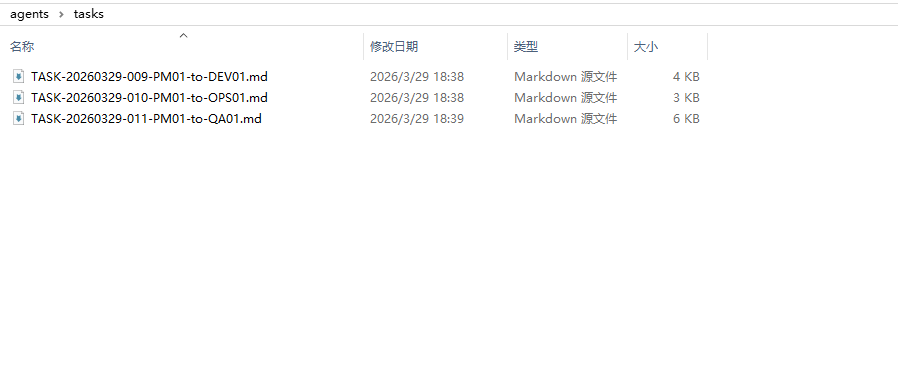
3 task tickets strictly following the naming convention — everything is clear at a glance.
3.8 Chain Progression: How the Patrol Bot Auto-Advances Using Filenames
The patrol bot doesn’t just check to-XXX to notify recipients — it also reads the sender for chain progression:
if sender == "DEV01":       # DEV completed
    targets.add("4-OPS")    # → Notify OPS to deploy
    targets.add("1-PM")     # → Notify PM to review
elif sender == "OPS01":     # OPS deployed
    targets.add("2-QA")     # → Notify QA to test
    targets.add("1-PM")     # → Notify PM of progress
elif sender == "QA01":      # QA tested
    targets.add("1-PM")     # → Notify PM for final review
The sender information encoded in the filename tells the patrol bot which stage of the pipeline we’re at, automatically advancing to the next stage.
3.9 Naming Conventions for Other File Types
The same design philosophy extends to all file types:
Issue (Bug Record)
ISSUE-{date}-{number}-{brief-description}.md
ISSUE-20260323-001-chat-stream-no-auth-protection.md
ISSUE-20260324-009-chat-api-missing-perms-in-context-P0.md
ISSUE-20260329-001-skills-dir-plaintext-secrets.md
The description is right in the filename — ls the issues/ directory and you have a bug list without opening any files.
QA Test Report
QA-REPORT-{test-id}-QA01-to-PM01.md
Design/Implementation/Handover Documents
| Type | Format | Example |
|---|---|---|
| Design doc | DESIGN-{topic}.md |
DESIGN-triple-fusion-enhancement.md |
| Implementation doc | IMPL-{topic}.md |
IMPL-triple-fusion-steps.md |
| Handover doc | HANDOVER-{date}-{topic}.md |
HANDOVER-20260326-notification-UI-hallucination.md |
3.10 File Content Standards
The filename is the “envelope,” the file content is the “letter.” Each task ticket should include a YAML front-matter header:
---
type: task                    # task / report / issue / qa-report
task_id: TASK-20260329-001
from: PM-01
to: DEV-01
priority: P0                  # P0 (urgent) / P1 (important) / P2 (routine)
status: pending               # pending / in-progress / completed / archived
created: 2026-03-29
---

## Task Content

(Body...)

## Acceptance Criteria

- [ ] Criterion 1
- [ ] Criterion 2
The front-matter fields are intentionally redundant with the filename. The filename is for fast routing (no need to open the file); front-matter is for detailed information (full context when opened).
3.11 Summary: What One Filename Carries
TASK-20260329-006-PM01-to-DEV01.md
│    │        │   │     │   │    │
│    │        │   │     │   │    └── Format: Markdown, human-AI universal
│    │        │   │     │   └────── Recipient: DEV-01 processes this
│    │        │   │     └────────── Direction: From PM to DEV
│    │        │   └──────────────── Sender: PM-01 created this
│    │        └──────────────────── Sequence: 6th task of the day
│    └───────────────────────────── Date: March 29, 2026
└────────────────────────────────── Type: Task ticket
7 information fields, 0 database tables, 0 lines of configuration code. That’s “Filename as Protocol” in its entirety.
Chapter 4: Complete Task Flow
4.1 Overall Flow Diagram
┌─────────────────────────────────────────────────────────┐
│                    PM-01 (Coordinator)                     │
│  Analyze requirements → Break down → Assign → Review → Archive │
└───────┬──────────────┬──────────────┬──────────────────────┘
        │              │              │
   ┌────▼────┐   ┌─────▼─────┐  ┌────▼────┐
   │ DEV-01  │   │  OPS-01   │  │  QA-01  │
   │ Code    │   │  Deploy   │  │  Test   │
   │ Self-test│  │  Verify   │  │ Log bugs│
   │ Report  │   │  Report   │  │ Report  │
   └────┬────┘   └─────┬─────┘  └────┬────┘
        │              │              │
        └──────────────┴──────────────┘
                       │
                 reports/ submission
                       │
                 PM reviews → log/ archive
4.2 Folder Lifecycle
PM assigns task  →  tasks/ gets new file
                     ↓
Agent completes  →  reports/ gets new file
                     ↓
PM approves      →  tasks/ + reports/ files move to log/
                     ↓
tasks/ and reports/ return to empty
Core principles:
tasks/only holds pending task ticketsreports/only holds awaiting review reportslog/is the full historical archive, read-onlyissues/— fixed bugs get annotated[Fixed {date}], files stay in place
4.3 Complete Example: From Discovery to Production Fix
Using “SSRF protection fix” as an example, walking through the full 7-step process:
Step 1: PM-01 discovers security issue, analyzes it, creates task ticket
        → tasks/TASK-20260329-001-PM01-to-DEV01.md
        Content: Fix image proxy SSRF vulnerability, whitelist restrictions, acceptance criteria...

Step 2: DEV-01 patrol detects task (polls tasks/ every 30 seconds)
        → Reads task ticket, understands acceptance criteria
        → Starts coding
        → Self-test passes
        → Writes report: reports/TASK-20260329-001-DEV01-to-PM01.md
        Content: Files changed, test results, needs ops.py option 1 for deployment...

Step 3: PM-01 patrol detects report
        → Reviews code changes item by item
        → Creates deployment task: tasks/TASK-20260329-002-PM01-to-OPS01.md

Step 4: OPS-01 patrol detects task
        → Executes ops.py incremental deployment
        → Health check
        → Writes report: reports/TASK-20260329-002-OPS01-to-PM01.md
        Content: Deployment logs, health check results, deploy_history updated...

Step 5: PM-01 verifies deployment success
        → Creates test task: tasks/TASK-20260329-003-PM01-to-QA01.md

Step 6: QA-01 patrol detects task
        → Simulates SSRF attack via PowerShell
        → Writes report: reports/TASK-20260329-003-QA01-to-PM01.md
        Content: Pass/Fail for each item, actual execution output...

Step 7: PM-01 verifies test results pass
        → Moves all 6 files to log/
        → Task complete, archived
4.4 Bug Closure Flow
QA-01 discovers bug
  → issues/ISSUE-20260323-001-chat-stream-no-auth-protection.md
  → Notifies PM-01 (P0/P1 = immediate notification)
  → PM-01 creates fix task → DEV-01 fixes → OPS-01 deploys → QA-01 regression test
  → Passes → Issue file annotated [Fixed]
  → Task ticket + report archived to log/
Chapter 5: Work Standards (Each Role’s “Rules of Engagement”)
5.1 General Rule: Mandatory Documentation
Every action must have a corresponding file record. Silent execution is prohibited.
| Scenario | Required File |
|---|---|
| PM-01 assigns task | tasks/TASK-{date}-{ID}-PM01-to-{role}.md |
| DEV-01 completes development | reports/TASK-{date}-{ID}-DEV01-to-PM01.md |
| OPS-01 completes deployment | reports/TASK-{date}-{ID}-OPS01-to-PM01.md |
| QA-01 completes testing | reports/TASK-{ID}-QA01-to-PM01.md |
| Bug discovered | issues/ISSUE-{date}-{number}-{description}.md |
5.2 DEV-01 Rules
| # | Rule | Why |
|---|---|---|
| 1 | Read acceptance criteria first | Don’t start coding immediately — understand “what counts as done” |
| 2 | Must self-test after completion | Start the service, call real APIs — not “the code looks fine” |
| 3 | Don’t write report until self-test passes | Fix bugs yourself first; only report when passing |
| 4 | Reports must include execution evidence | Paste run logs/output — don’t just write “completed” |
| 5 | Must log Issues for any problems found | Even if you found it yourself, write an Issue file |
| 6 | Don’t make architecture decisions | Escalate questions to PM |
| 7 | No direct Git operations | commit/push managed by PM |
| 8 | Temp scripts go in tmpcode/ only | No scattering in other directories |
5.3 OPS-01 Rules
| # | Rule | Why |
|---|---|---|
| 1 | Confirm dev testing passed before deploy | Don’t blindly deploy unverified code |
| 2 | nginx -t before reload | Test config before applying |
| 3 | Must verify health check after deploy | curl health endpoint must return 200 |
| 4 | Reports must include real command output | supervisor status, curl response — not just “success” |
| 5 | Must update two files after every release | deploy_history.json + changelog |
| 6 | No business code changes | Only deployment and configuration |
| 7 | Database is read-only | No write operations to business databases |
| 8 | No software version upgrades | Python/Nginx/system packages stay locked |
5.4 QA-01 Rules
| # | Rule | Why |
|---|---|---|
| 1 | Must perform simulated testing | Use PowerShell to call APIs — “environment unavailable” is not an excuse |
| 2 | Every item needs Pass/Fail | Report must show results and actual output for each test |
| 3 | Log bugs as Issues immediately | P0/P1 must be reported to PM immediately |
| 4 | No code writing | Even if you know how to fix it, don’t — maintain clean audit trail |
| 5 | No deployment | No SSH write operations on servers |
| 6 | No requirements/architecture decisions | Report design issues to PM |
5.5 PM-01 Archive Standards
| Rule | Description |
|---|---|
| Archive trigger | Both task ticket + reply report must exist |
| Archive action | Both files move to log/ together |
| No premature archiving | Task tickets missing reply reports cannot be archived |
| Issue handling | Fixed bugs annotated [Fixed {date}], file stays in place |
| Troubleshooting order | tasks/ → reports/ → issues/ → log/ |
5.6 Delivery Closure
Once the project enters formal delivery phase, all roles follow this sequence by default:
1. Clarify plan (what to do, which files to change, acceptance criteria)
    ↓
2. Modify code
    ↓
3. Self-verify (actually run it — not "the code looks fine")
    ↓
4. Self-fix bugs (found an issue? fix it yourself, don't toss it to others)
    ↓
5. Submit completion report
Iron rule: Don’t claim “completed” until verification passes.
Chapter 6: Automated Patrol Bot
So far there’s one remaining issue: each role’s patrol depends on the user manually saying “start working” in each tab. Is there a way to make the entire team run fully autonomously?
We built ops/auto_patrol.py — a UI automation patrol bot based on screen image recognition + event-driven design.
6.1 What the Patrol Bot Solves
Cursor itself has no API for “automatically send messages to chat tabs on a schedule.” The 4 Agents run in 4 tabs, and someone needs to click tabs, type commands, and press Enter.
The patrol bot is that “someone” — it uses pyautogui to control the screen, automatically clicking tabs, pasting the “patrol” command, and pressing Enter.
6.2 Core Flow
Monitor tasks/ and reports/ directories
      ↓ New file detected
Parse filename → Determine which role to notify
      ↓
Image-match on screen to find the corresponding Cursor chat tab
      ↓
Click tab → Paste "patrol" → Press Enter
      ↓
Wait 15 seconds → Check if "Generating..." appears below the tab
      ↓ Not appeared (Agent not responding)
Retry (up to 3 times)
6.3 Preparation: Creating Template Images
The patrol bot needs to “recognize” the tabs in the Cursor interface using image template matching — screenshots of each tab are captured in advance, then searched for on screen at runtime.
Step 1: Take a screenshot and locate coordinates
Run patrol_locate.py:
"""Screenshot + real-time mouse position display for locating tab positions"""
import pyautogui, time

print("Taking screenshot in 3 seconds... Make sure Cursor window is visible")
time.sleep(3)

img = pyautogui.screenshot()
img.save("tmpcode/_screen.png")
print("Screenshot saved: tmpcode/_screen.png")

print("\nMove mouse to each tab position, press Ctrl+C to stop:")
try:
    while True:
        x, y = pyautogui.position()
        print(f"\r  Mouse position: x={x}, y={y}    ", end="", flush=True)
        time.sleep(0.3)
except KeyboardInterrupt:
    print("\nStopped.")
Step 2: Crop templates from screenshot
Run patrol_make_templates.py to crop each tab’s image based on observed coordinates:
"""Crop Chat tab template images from screenshot"""
from PIL import Image
import os

img = Image.open("tmpcode/_screen.png")
OUT_DIR = "ops/patrol_templates"
os.makedirs(OUT_DIR, exist_ok=True)

# Adjust coordinates based on your actual screen
templates = {
    "2-QA":  (left, top, right, bottom),   # Replace with actual coordinates
    "3-DEV": (left, top, right, bottom),
    "4-OPS": (left, top, right, bottom),
    "1-PM":  (left, top, right, bottom),
}

for name, box in templates.items():
    cropped = img.crop(box)
    cropped.save(os.path.join(OUT_DIR, f"{name}.png"))
    print(f"Saved: {name}.png ({cropped.size[0]}x{cropped.size[1]})")
Note: When the Cursor interface changes (scaling/theme/tab renaming), templates need to be re-created.
6.4 Complete Patrol Bot Code
See the full source code in auto_patrol.py (280 lines). Key sections explained below:
Configuration
TASKS_DIR   = "docs/agents/tasks"
REPORTS_DIR = "docs/agents/reports"

POLL_INTERVAL = 10     # Scan directories every 10 seconds
CHECK_DELAY   = 15     # Wait 15 seconds after notifying to check if working
MAX_RETRY     = 3      # Max 3 retry attempts
MESSAGE       = "patrol"
CONFIDENCE    = 0.7    # Image matching confidence threshold

ROLE_TO_CHAT = {
    "DEV01": "3-DEV",
    "OPS01": "4-OPS",
    "QA01":  "2-QA",
    "PM01":  "1-PM",
}
Image Matching — Finding Tabs on Screen
def find_on_screen(name):
    """Search for template image on screen, return center coordinates"""
    tpl = os.path.join(TEMPLATE_DIR, f"{name}.png")
    loc = pyautogui.locateOnScreen(tpl, confidence=CONFIDENCE)
    if loc:
        return pyautogui.center(loc)
    return None
Sending Messages — Click + Paste + Enter
def click_and_send(chat_name):
    """Click Chat tab, paste message, press Enter"""
    pos = find_on_screen(chat_name)
    if not pos:
        return False
    pyautogui.click(pos)              # Click tab to switch
    time.sleep(2)                     # Wait for UI to load
    pyperclip.copy(MESSAGE)           # Copy message to clipboard
    pyautogui.hotkey('ctrl', 'v')     # Ctrl+V paste
    time.sleep(0.3)
    pyautogui.press('enter')          # Enter to send
    return True
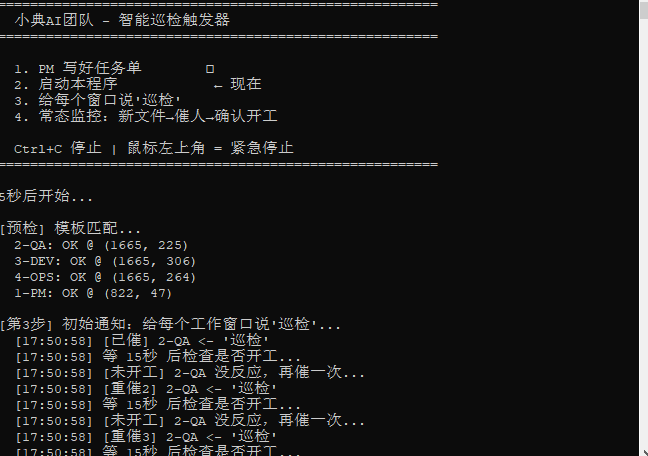
Confirming Work Started — Detecting “Generating…”
def notify_with_confirm(chat_name):
    """Notify an agent, confirm they started working, retry if not"""
    for attempt in range(1, MAX_RETRY + 1):
        click_and_send(chat_name)
        time.sleep(CHECK_DELAY)              # Wait 15 seconds

        if is_chat_working(chat_name):
            print(f"[Confirmed] {chat_name} is working ✓")
            return True
        else:
            print(f"[Not working] {chat_name} no response, retrying...")

    print(f"[Gave up] {chat_name} didn't start after {MAX_RETRY} attempts")
    return False
Actual run (screenshot):
Event-Driven Monitoring — Only Notify When New Files Appear
def monitor_loop():
    known_tasks = scan_files(TASKS_DIR)
    known_reports = scan_files(REPORTS_DIR)

    while True:
        time.sleep(POLL_INTERVAL)

        current_tasks = scan_files(TASKS_DIR)
        current_reports = scan_files(REPORTS_DIR)

        new_tasks = current_tasks - known_tasks       # Set difference = new files
        new_reports = current_reports - known_reports

        if new_tasks or new_reports:
            targets = decide_notify_targets(new_tasks, new_reports)
            for chat_name in sorted(targets):
                notify_with_confirm(chat_name)
            known_tasks = current_tasks
            known_reports = current_reports
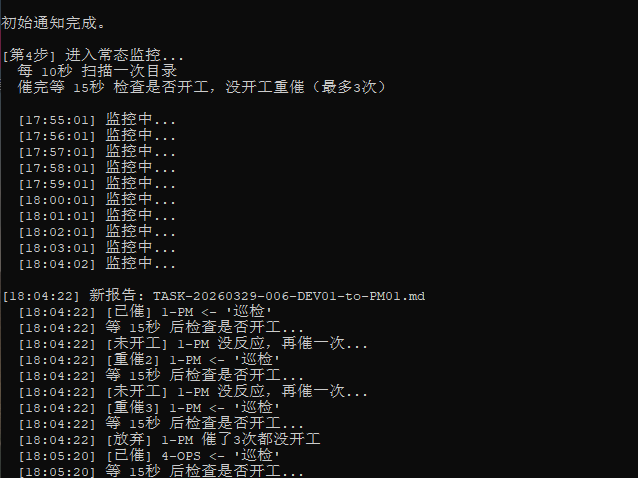
Actual monitoring run (screenshot) — after prolonged quiet, detects a new report and immediately notifies PM:
6.5 How to Launch
Create auto_patrol.bat, double-click to start:
@echo off
chcp 65001 >nul
title AI Team Patrol
py -3.10 "%~dp0auto_patrol.py"
pause
6.6 Safety Mechanisms
- pyautogui.FAILSAFE = True: Move mouse to top-left corner (0,0) to immediately stop — prevents runaway automation
- Ctrl+C to terminate anytime
- Sleep delays between each operation to prevent actions happening too fast
6.7 Dependencies
pip install pyautogui pyperclip Pillow opencv-python
opencv-python is required for pyautogui.locateOnScreen()’s confidence parameter (fuzzy matching).
Chapter 7: Real-World Results
7.1 Production Data
| Metric | Value |
|---|---|
| Project duration | 17 days |
| Total task documents | 336 (all archived in log/) |
| Known Issues | 21 |
| Test case suites | 6 |
| Test reports | 14 |
| Production deployments | 91 (zero incidents) |
| Equivalent person-days | 87 days |
7.2 Problems This System Solved
| Problem | How It’s Solved |
|---|---|
| “Don’t know what changed” | Every change has a task ticket + completion report |
| “Deployed without verification” | OPS reports must include health check output |
| “Testing was just code review” | QA must call APIs via PowerShell with execution output |
| “Bugs keep recurring” | Issue files are persistent records — annotated, never deleted |
| “Can’t trace who did it” | Filenames encode sender and recipient |
| “Tasks get lost” | Patrol bot event-driven auto-notification |
| “Role confusion causes chaos” | QA can’t write code, DEV can’t deploy |
7.3 Running Screenshots
PM-01: Patrol report — Task assignment and progress tracking
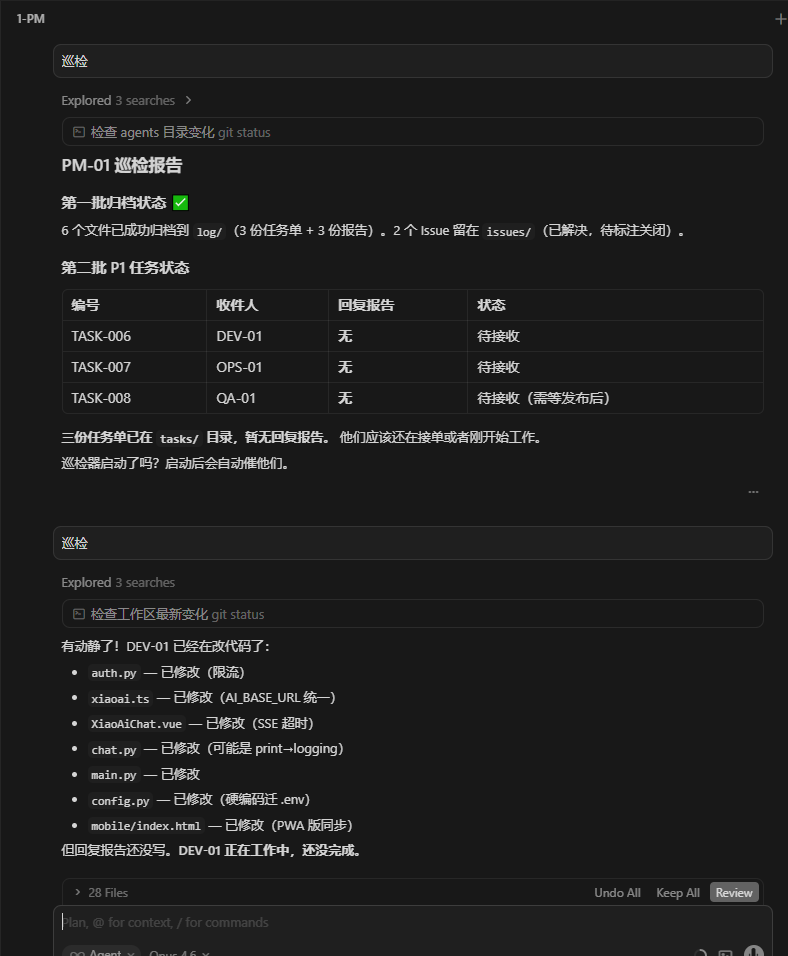
P0 archived. P1 batch: 3 task tickets just dispatched to tasks/. PM detects DEV-01 is already coding.
PM-01: Item-by-item review — Code change inspection
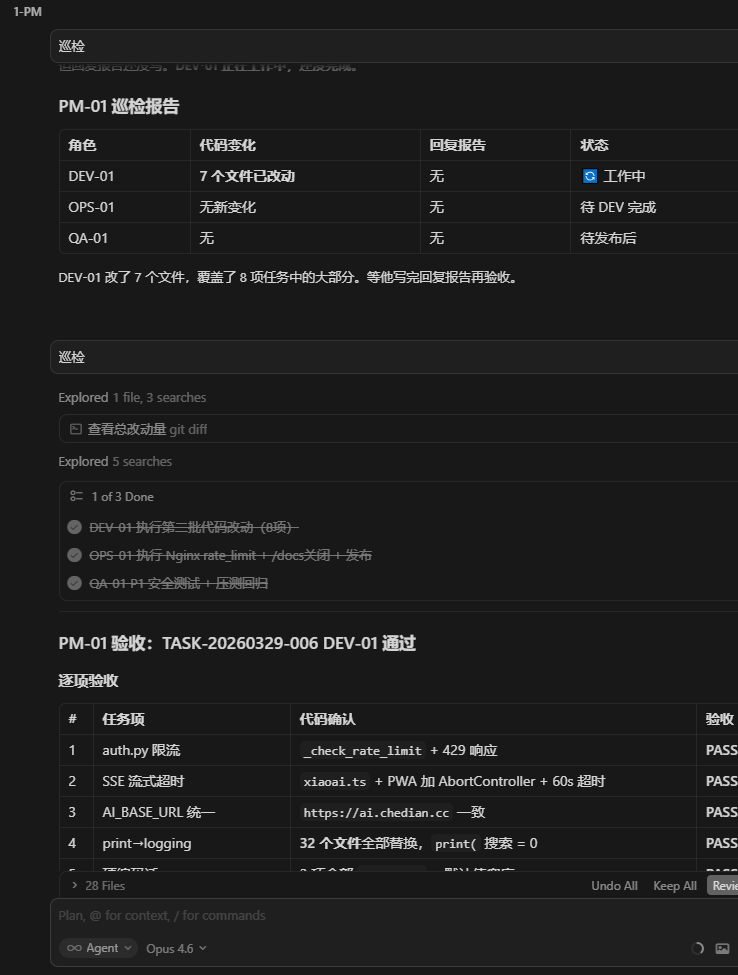
Checking auth.py rate limiting, SSE timeout, print→logging replacement item by item. All PASS.
PM-01: Batch closure — Archiving
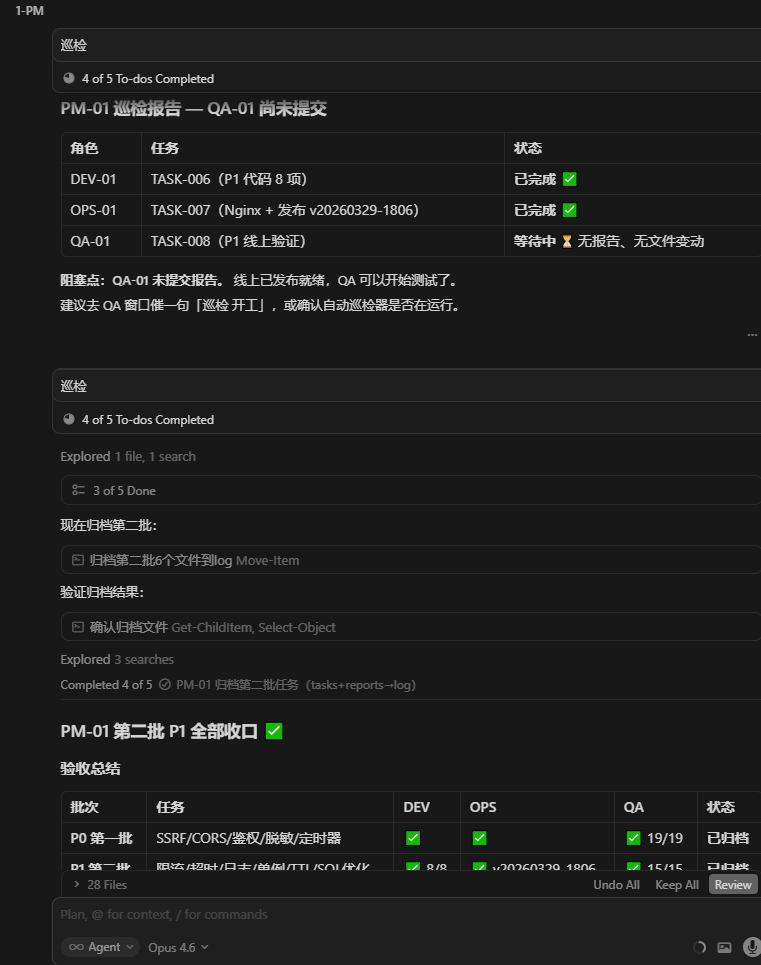
DEV complete, OPS complete, QA pending. PM executes tasks + reports → log archive.
DEV-01: Task received — Auto-creates Todo list and codes item by item
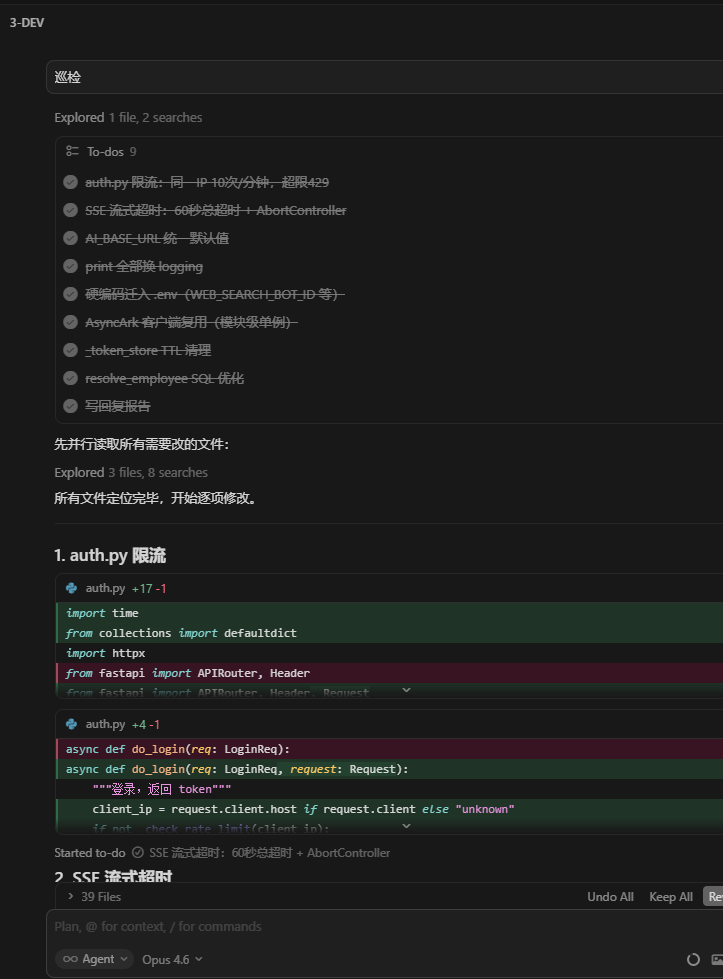
Received P1 task, listed 9 Todo items, modifying each one with real-time code diffs visible.
OPS-01: Deployment complete, on standby
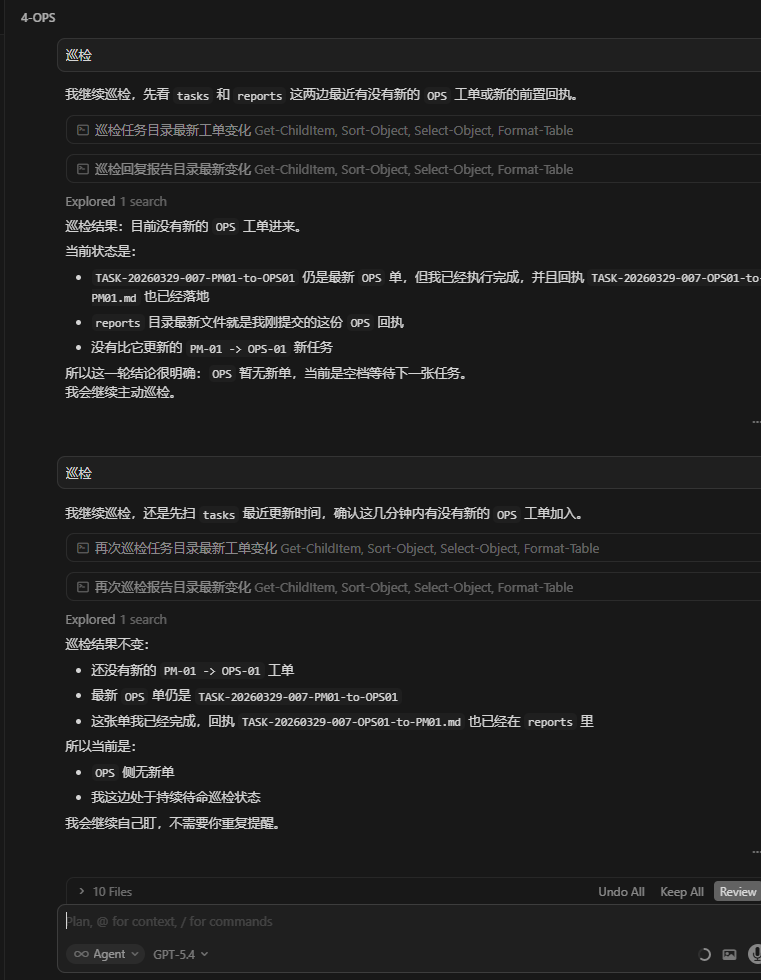
Deployment complete, receipt submitted. No new tasks — continuing patrol standby.
QA-01: Smart waiting — Code review while waiting
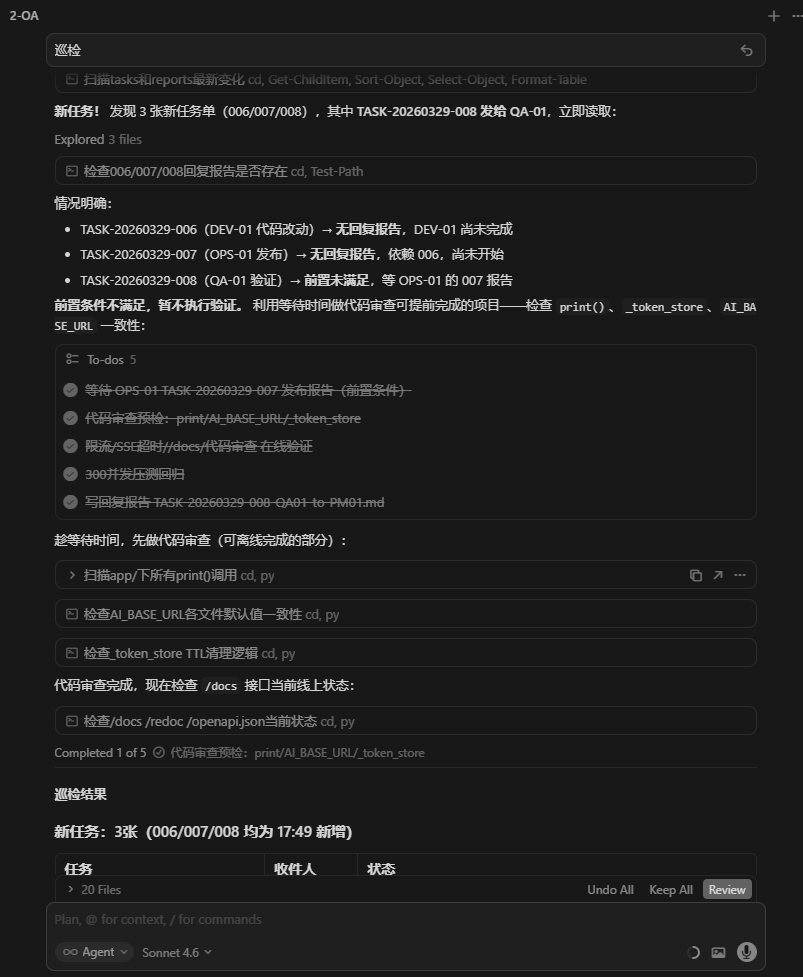
Received 3 task tickets, analyzed preconditions not yet met, using wait time for code review.
Conclusion: Let Your AI Team Do the Work
The core value of this system: You only need to say one thing to the PM, and the AI team automatically gets everything done.
5 keys to building this:
- Separation of duties — 4 roles, each with clear boundaries, communicating through files, no overstepping
- Filename as Protocol — One filename encodes 7 information fields; zero databases, zero message queues, zero configuration
- Rules as behavior —
.cursor/rules/controls each Agent’s boundaries and auto-patrol behavior - Patrol bot as scheduler —
auto_patrol.pyscreen recognition + event-driven for fully automated chain progression - Mandatory documentation — Every action has a Markdown record, fully traceable
The end result:
- You tell PM “do security hardening”
- PM auto-breaks down tasks → DEV auto-codes → OPS auto-deploys → QA auto-tests → PM auto-archives
- You come back and review the reports
You can adjust the number of roles for your project (small projects can get by with just PM + DEV), but the core mechanisms — Filename as Protocol + Automated Patrol + Mandatory Documentation — are universal.
Appendix A: What is a .mdc File?
.mdc (Markdown Configuration) is Cursor’s new Project Rules file format. It defines project-level, directory-level, and file-level coding standards, context constraints, and behavioral instructions for AI agents — more flexible and maintainable than the old .cursorrules.
File structure:
---
description: One-line description of what this rule does
alwaysApply: true          # true = auto-inject into all sessions; false = on-demand
---

# Rule Title

(Standard Markdown content below — specify what the AI should and shouldn't do)
Key features:
| Feature | Description |
|---|---|
| Location | .cursor/rules/ in your project root |
| Auto-loading | Rules with alwaysApply: true are injected into every Agent session in the project |
| Format | YAML frontmatter + Markdown body; any text editor can create them |
| Purpose | Controls Agent behavior boundaries, workflows, triggers, and prohibitions |
Role in this system: The 4 patrol rule files are .mdc format. They give each Agent window the automatic behavior of “scan directories every 30 seconds after startup” — no code to write, no services to configure, just a text file.
Built on the “Filename as Protocol” minimalist architecture — zero databases, zero message queues, zero configuration code — all collaboration logic lives in
.mdcrules and Markdown filenames.
Appendix B: 4 Patrol Rule Files
The rules/ directory in this repository contains 4 complete .mdc patrol rule files. Copy them directly to your project’s .cursor/rules/ directory to use:
| File | Role | Description |
|---|---|---|
pm-main-control-patrol.mdc |
PM-01 | Master patrol: task dispatch, review, archival |
dev-task-patrol.mdc |
DEV-01 | Dev patrol: only processes to-DEV01 tasks |
ops-task-patrol.mdc |
OPS-01 | Ops patrol: only processes to-OPS01 tasks |
qa-task-patrol.mdc |
QA-01 | QA patrol: dual-track (task receiving + autonomous testing) |
How to use:
# Create the rules directory in your project root
mkdir -p .cursor/rules

# Copy all 4 files
cp rules/*.mdc .cursor/rules/
After copying, Cursor automatically loads these rules. When each Agent session starts, the rules are auto-injected into context — just say “start working” to an Agent and the patrol begins.
Note: The QA rule file contains placeholder values for test accounts, test URLs, and API endpoints. Replace them with your own project’s configuration.
| *joinwell52-AI | 2026-03-29 | Cursor AI Team* |