
Find your next task知道接下来做什么
TASK records the assignment and recipient. Agents follow the protocol to find their work.TASK 记录工作内容和接收方,Agent 按文件约定找到自己的任务。
25 Canonical MCP Tools and 6 read-only Core Resources.25 个 Canonical MCP Tools 和 6 个只读 Core Resources。
MULTI-AGENT COLLABORATION · FILES AS PROTOCOL
Protocol text协议原文: 简体中文 ↗ · English ↗
FCoP — File-based Coordination Protocol
New session, same project explanation? An agent says “done”, but where is the result? Let multiple agents work as a team: PM assigns work, members deliver reports, and PM summarizes for you. Keep it all in project files.换个会话,又要从头解释项目?Agent 说“改好了”,结果在哪里?让多个 Agent 像团队一样工作:PM 派单,成员交付,PM 汇总。任务和结果,都留在项目文件里。
01 / WHY FCOP
Assignments, deliveries, blockers and decisions stay together in the project.任务、交付、阻碍和决定,都保留在项目里。
TASK records the assignment and recipient. Agents follow the protocol to find their work.TASK 记录工作内容和接收方,Agent 按文件约定找到自己的任务。
REPORT keeps delivery evidence, REVIEW records checks and decisions, and ISSUE preserves blockers.REPORT 留下交付证据,REVIEW 记录检查与决定,ISSUE 保存遇到的问题。
The next agent can read the same files. Use your editor and Git for suitable records; no coordination database or broker to deploy.接手 Agent 可以读取同一份文件。用编辑器查看、把适合的记录纳入 Git,无需另配协作数据库或消息队列。
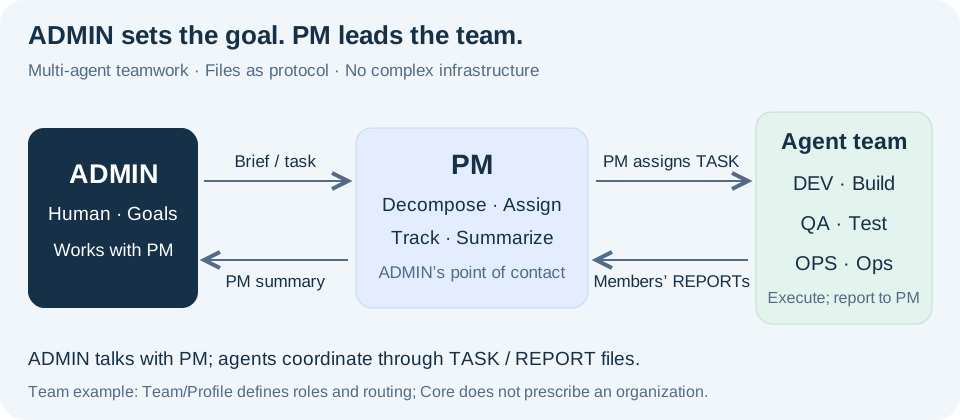
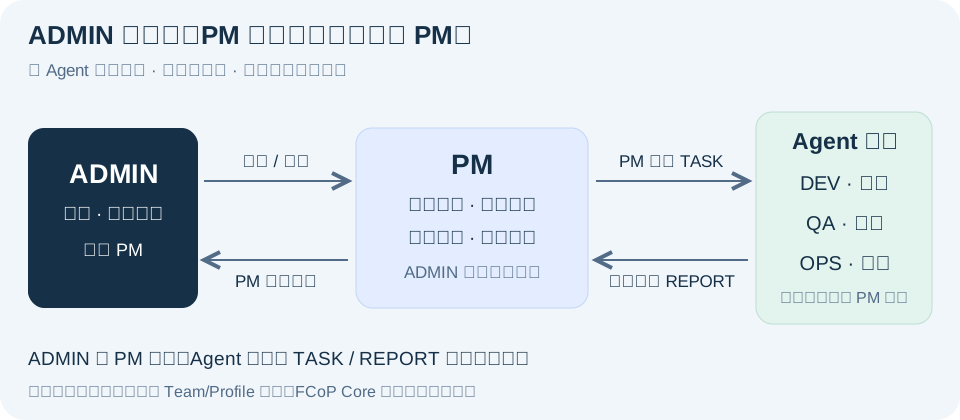
Only the human ADMIN and PM chat. PM assigns TASK files; members execute and return REPORT files; PM consolidates the results for ADMIN. Agents do not chat with each other; they collaborate through files.只有真人 ADMIN 与 PM 聊天。PM 拆解工作,通过 TASK 文件分派;成员各自执行,通过 REPORT 文件回报;PM 汇总结果后向 ADMIN 汇报。Agent 之间不聊天,通过文件协作。
A scripted PM assigns work to DEV and QA, reads their reports and summarizes for ADMIN. No model or API key is required. With Git and Python 3.10+ installed, run:脚本模拟 PM 给 DEV、QA 派单,读取成员报告,再向 ADMIN 汇总。无需模型或 API Key,准备好 Git 和 Python 3.10+ 后运行:
git clone https://github.com/joinwell52-AI/FCoP.git
cd FCoP
python -m pip install "fcop==4.0.5"
python examples/team_workflow.py --output ./demo-runs
Open the printed workspace path: 3 TASKs, 3 REPORTs and 1 assessment REVIEW remain on disk. Read PM's summary, then follow the files to DEV's delivery and QA's check. This sequential example leaves tasks in review, awaiting formal acceptance.打开终端打印的工作区:3 份 TASK、3 份 REPORT、1 份 assessment REVIEW 都在磁盘上。先看 PM 的汇总,再沿文件找到 DEV 交付与 QA 检查。这个顺序执行的案例完成交付,任务保留在 review 等待正式验收。
BEFORE YOU INSTALL / 安装前问答
What it adds, where it runs, and what you can see.有什么用,装在哪里,能看到什么。
01
Preserve assignments, deliveries, problems and decisions as TASK, REPORT, ISSUE and REVIEW. The next agent can read the work; delivery remains separate from acceptance.把分工、交付、问题和决定保存为 TASK、REPORT、ISSUE、REVIEW。接手 Agent 可以读取工作记录;交付与验收明确分开,
02
Runtime and platform developers can use from fcop import Project. Ordinary project users usually use the CLI for setup and diagnosis, and MCP for actual agent work—without adding FCoP to business code.Runtime 或平台开发者可以使用 from fcop import Project。普通项目通常用 CLI 初始化和诊断、用 MCP 完成 Agent 工作,无需在业务代码中引用 FCoP。
03
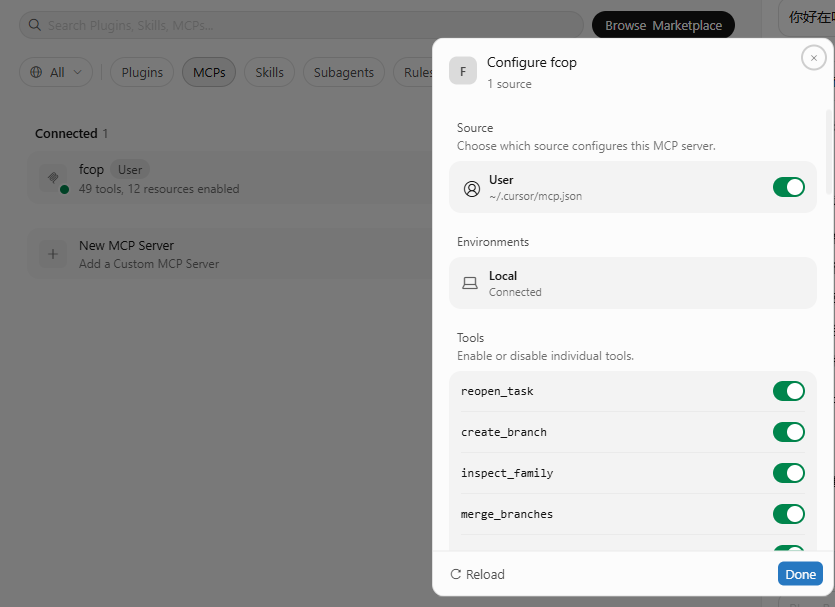
Yes. Configure fcop-mcp and the client receives 25 Canonical MCP Tools and 6 read-only Core Resources for task, report, issue, review and Branch work. The client or host Runtime still runs the agents.是的。配置 fcop-mcp 后,客户端获得 25 个 Canonical MCP Tools 和 6 个只读 Core Resources,用于 TASK、REPORT、ISSUE、REVIEW 和 Branch 协作;Agent 仍由客户端或宿主 Runtime 运行。
04
Install: run fcop version and fcop doctor. Connect MCP: see tools and resources. Initialize: create <project>/fcop/. Execute a task: inspect actual TASK and REPORT records. The minimal example also produces QA evidence and PM's summary.安装后可运行 fcop version、fcop doctor;连接 MCP 后看到工具与资源;初始化后建立 <project>/fcop/;执行任务后可检查真实 TASK、REPORT。最小案例还会留下 QA 审查与 PM 汇总报告。
02 / GET STARTED
Ask your coding agent to install and verify FCoP, or configure MCP yourself.让编程 Agent 安装并验证 FCoP,也可以自己配置 MCP。
Install FCoP for the coding client and project I am using. Follow:
https://github.com/joinwell52-AI/FCoP/blob/main/docs/ai-install.md
Run the environment checks, installation, configuration and verification yourself. Preserve my existing configuration and project state. Report what actually works; ask me only for a missing client/project choice or a required approval/reload.请为我当前使用的 AI 编程客户端和项目安装 FCoP,按这份说明操作:
https://github.com/joinwell52-AI/FCoP/blob/main/docs/ai-install.md
环境检查、安装、配置和验收都由你执行。保留我现有的配置和项目状态。完成后告诉我实际验证结果;只在缺少客户端/项目选择,或确实需要授权、重连时让我介入。Your agent checks dependencies, configures the client and verifies a real task. It will point out any approval or reload the client requires. Read the AI installation guide ↗AI 检查依赖、配置客户端并验证真实任务。客户端确实需要你授权或重连时,AI 会指出具体一步。查看 AI 安装说明 ↗
python -m pip install "fcop==4.0.5" "fcop-mcp==4.0.5"
fcop tools
Add this server to your MCP configuration, preserving other servers. Replace the two absolute paths with your Python interpreter and project.在 MCP 配置中加入这个服务,保留其他服务。将两个绝对路径换成你的 Python 解释器和项目路径。
{
  "mcpServers": {
    "fcop": {
      "command": "/absolute/path/to/python",
      "args": ["-m", "fcop_mcp"],
      "env": {"FCOP_PROJECT_DIR": "/absolute/path/to/my-project"}
    }
  }
}
Reconnect, check the tools, then follow the installation guide to initialize the project, adopt team rules and execute a task.重连并检查工具列表,再按安装说明初始化项目、采用团队规则并执行一份任务。 Full guide, including Codex ↗完整说明(含 Codex 配置)↗
FCoP offers one file-native approach to multi-agent collaboration. CodeFlowMu puts it to work in a development team with PM, DEV, QA and OPS, adding client integration, execution and progress views.FCoP 为多 Agent 协作提供一种文件原生的解决方案。CodeFlowMu 已将它用于 PM、DEV、QA、OPS 开发团队,提供客户端接入、运行和进度查看,让协议成为实际应用的一部分。
Use FCoP independently, or explore CodeFlowMu, distributed as a proprietary preview. FCoP is MIT open source.你可以独立使用 FCoP,也可以体验 CodeFlowMu 的专有软件预览版。FCoP 按 MIT 开源。
Explore CodeFlowMu ↗了解 CodeFlowMu 与下载入口 ↗Want to try it in your next multi-agent project?想在下一个多 Agent 项目里试试? ☆ Star FCoP
CLI = Setup + Observe + Diagnose; MCP = Work.
| Command命令 | Purpose用途 |
|---|---|
fcop init | Initialize an FCoP workspace初始化 FCoP workspace |
fcop status | View workspace status查看 workspace 状态 |
fcop inspect | Inspect TASK / REPORT / ISSUE / REVIEW检查 TASK / REPORT / ISSUE / REVIEW |
fcop validate | Validate protocol structure验证协议结构 |
fcop tools | Inspect the installed MCP Tool Catalog查看已安装的 MCP 工具目录 |
fcop doctor | Diagnose installation, environment and compatibility检查安装、环境和兼容性 |
fcop version | Show installed versions查看已安装版本 |
fcop spec | Show specification / rule identity查看规范 / 规则身份 |
fcop migrate | Explicit legacy migration; review the plan before apply显式迁移旧工作区;先检查计划,再决定 apply |
python -m pip install fcop

fcop version
fcop doctor
fcop init --root ./my-project
fcop status --root ./my-project
fcop validate --root ./my-project
Optional MCP catalog:查看可选 MCP 工具目录:
python -m pip install fcop-mcp

fcop tools
fcop tools merge_branches --json
Once installed, CLI setup, observation, validation and diagnosis work locally and offline. doctor does not access the network or modify Host configuration. Installation may need a package index; offline installation requires local packages. CLI does not perform create_task, approve, Branch, merge or authorization work operations: use MCP or the Python API.安装后,CLI 可在本地离线初始化、查看、校验和诊断;doctor 不联网、不修改 Host。安装包可能需要包索引,离线安装须预备本地包。CLI 不负责 create_task、approve、Branch、merge 或 authorization 工作操作:请使用 MCP 或 Python API。
Installing fcop does not create Host instruction files. Normal v4 workspace state belongs in <project>/fcop/; project-root Host instructions remain application-owned. Existing atomic initialization staging and failure evidence are preserved. Migration is explicit, never an automatic upgrade step.安装 fcop 不创建 Host 指令文件。v4 正常 workspace 状态写入范围为 <project>/fcop/;项目根 Host 指令属于宿主应用。保留既有原子初始化暂存与失败证据。迁移必须显式执行,不是自动升级步骤。
In an active Python 3.10+ virtual environment:在已激活的 Python 3.10+ 虚拟环境中:
python -m pip install "fcop==4.0.5"Save as demo.py, then run python demo.py.保存为 demo.py,运行 python demo.py。
from pathlib import Path
from tempfile import TemporaryDirectory

from fcop import Project

with TemporaryDirectory(prefix="fcop-demo-") as directory:
    root = Path(directory) / "workspace"
    project = Project(root)
    workspace = project.create_workspace(protocol_version="4.0")
    request = dict(
        workspace_id=workspace["workspace_id"],
        operation_id="demo-create-1",
        sender="author", recipient="worker",
        subject="Inspect this handoff",
        body="Read the task and check the evidence before accepting delivery.",
    )
    first = project.create_task(**request)

    next_client = Project(root)
    state = next_client.inspect_state(task_id=first["task_id"])
    retry = next_client.create_task(**request)

    assert Path(state["path"]).is_file()
    assert retry["existing"] and retry["task_id"] == first["task_id"]
    print("State read from disk:", state["stage"])
    print("Same task after retry:", retry["task_id"] == first["task_id"])
State read from disk: inbox
Same task after retry: TrueThe demo cleans up its temporary directory. Reusing the same create operation and payload returns the existing task.示例会清理临时目录。相同创建身份和载荷的重试,会返回已有任务。
Install in the same active environment:在同一已激活环境中安装:
python -m pip install "fcop==4.0.5" "fcop-mcp==4.0.5"Or use uvx to obtain an isolated installation automatically. Configure Cursor or Codex using the examples below; the client starts the server.也可以用 uvx 自动准备隔离安装环境。按下方示例配置 Cursor 或 Codex,由客户端启动服务。
First install uv and confirm uvx --version works in a new terminal. The first connection downloads packages and can take longer.先安装 uv,在新终端确认 uvx --version 可用。首次连接需要下载依赖,可能稍慢。
After connecting, call init_workspace() for a new pure v4 workspace, then create and inspect a task. Team/Solo/ME, seats and Host sessions are outside Base Protocol.连接后,用 init_workspace() 初始化纯 v4 工作区,再创建与检查任务。Team、Solo、ME、seat 与 Host session 不属于 Base Protocol。
Parallel work is available through create_branch, inspect_family and merge_branches: create independent Branch tasks, inspect current REPORT evidence and the canonical family digest, then commit one explicit convergence decision through the Core atomic merge operation.并发工作由 create_branch、inspect_family 和 merge_branches 支持:创建独立 Branch、检查当前 REPORT 证据与规范 family digest,再通过 Core 原子合并提交一次明确的收敛决定。
create_branch → REPORTs → inspect_family → merge_branches
Default initialization has no trusted authorization Profile. Acceptance, rejection, reopening and archiving require an adopted Profile and a trusted host evaluator. A role name alone grants no permission.默认初始化不含可信授权 Profile。验收、退回、重开和归档需要显式采纳 Profile,并由可信宿主判断签发权限。角色名本身不能赋权。
These examples pin both packages to 4.0.5. Replace D:/your-project with the absolute workspace path. On macOS/Linux, use a path such as /Users/you/project.示例将两个包固定为 4.0.5。把 D:/your-project 换成工作区绝对路径;macOS/Linux 可写成 /Users/you/project。
Merge this server into .cursor/mcp.json in your project. Preserve existing servers.在项目的 .cursor/mcp.json 中加入这个服务,保留已有的其他服务。
{
  "mcpServers": {
    "fcop": {
      "type": "stdio",
      "command": "uvx",
      "args": [
        "--from",
        "fcop-mcp==4.0.5",
        "--with",
        "fcop==4.0.5",
        "fcop-mcp"
      ],
      "env": {
        "FCOP_PROJECT_DIR": "D:/your-project"
      }
    }
  }
}
Save and restart Cursor. Open the MCP server list and check that fcop connects and its tools are available to Agent.保存后重启 Cursor,在 MCP 服务列表检查 fcop 已连接、Agent 能看到工具。
With Codex CLI and uv installed, run:已安装 Codex CLI 和 uv 时,执行:
codex mcp add fcop --env "FCOP_PROJECT_DIR=D:/your-project" -- uvx --from fcop-mcp==4.0.5 --with fcop==4.0.5 fcop-mcpThis adds a user-level server for that fixed workspace path. Run codex mcp list to check configuration. Restart the client and use /mcp to inspect the connection.这会添加用户级服务,固定指向上方工作区。运行 codex mcp list 检查配置,重启客户端后用 /mcp 查看连接状态。
For just one trusted project, use its .codex/config.toml instead of the command above:如果只给一个已信任项目使用,改用该项目的 .codex/config.toml,无需执行上方添加命令:
[mcp_servers.fcop]
command = "uvx"
args = ["--from", "fcop-mcp==4.0.5", "--with", "fcop==4.0.5", "fcop-mcp"]
startup_timeout_sec = 60

[mcp_servers.fcop.env]
FCOP_PROJECT_DIR = "D:/your-project"
If uvx cannot be found, use its absolute executable path in command. Install → connect MCP → initialize workspace → use FCoP. FCoP owns <project>/fcop/, not project-root Host instructions. The nine bilingual modules are read through package/MCP resources; no Host projection or redeployment is required. Existing AGENTS.md, CLAUDE.md and Cursor rules stay unchanged.若找不到 uvx,将 command 改为绝对路径。安装 → 连接 MCP → 初始化工作区 → 使用 FCoP。FCoP 拥有 <project>/fcop/,不拥有项目根 Host 指令。九模块双语规则通过包内及 MCP resources 读取,无需 Host 投影或重部署;已有 AGENTS.md、CLAUDE.md 和 Cursor 规则保持不变。 Rule resources / 规则资源 ↗
FCoP — File-based Coordination Protocol
The 4.0 specification defines it as a file-native agent behavior-governance protocol.基于文件的协调协议。4.0 正式规范定义:文件原生的 Agent 行为治理协议。
Files carry protocol. Paths express state. Events record transitions. The filename identifies a record; its header identifies sender and recipient; its body holds the work.文件承载协议,路径表达状态,事件记录迁移。文件名标识记录,文件头标明收发方,正文承载工作内容。
Legacy v1–v3 names such as TASK-20260915-001-PM-to-DEV.md expose routing directly. In the current 4.0 implementation, TASK-<uuid>.md uses header fields such as sender: PM and recipient: DEV. Agents or callers read those fields to select work for their established role.Legacy v1–v3 的 TASK-20260915-001-PM-to-DEV.md 直接用文件名表达路由。当前 4.0 实现使用 TASK-<uuid>.md,以文件头中的 sender: PM、recipient: DEV 标明收发方;Agent 或调用方读取这些字段,按已确定的角色选择任务。
PM, DEV, QA and OPS in dev-team are defined by its Team/Profile; they are not fixed roles in FCoP Core. FCoP also does not schedule agents or merge application code.dev-team 中的 PM、DEV、QA、OPS 由 Team/Profile 定义,不是 FCoP Core 的固定角色。FCoP 也不负责调度 Agent 或合并应用代码。
03 / EVIDENCE & ACCEPTANCE
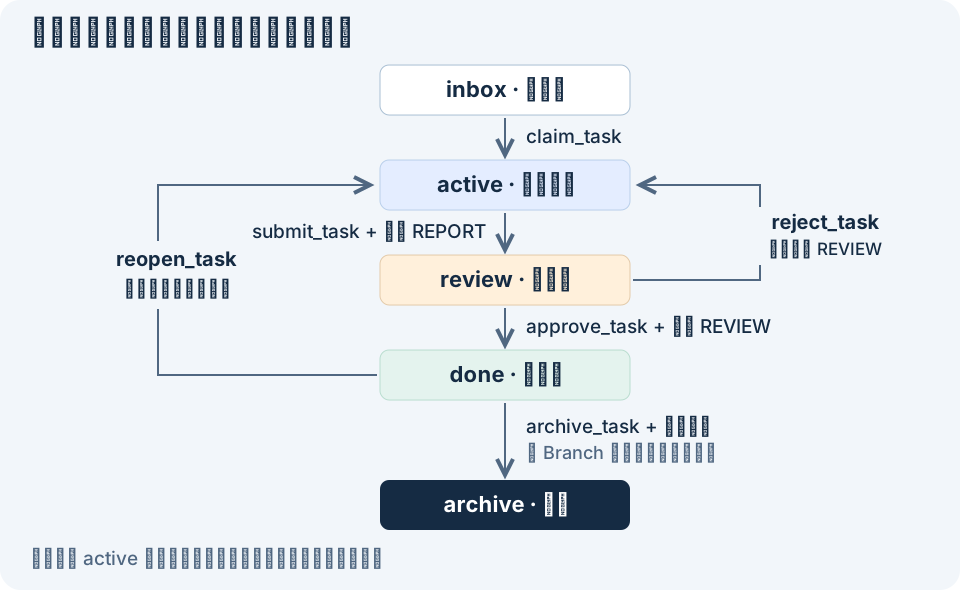
Every new active attempt gets its own identity. An old report cannot satisfy a new attempt. There is no direct active → done transition in 4.0.每次进入执行状态都有新的尝试身份。旧报告不能满足新尝试的门槛;4.0 不允许 active → done 直接跳转。
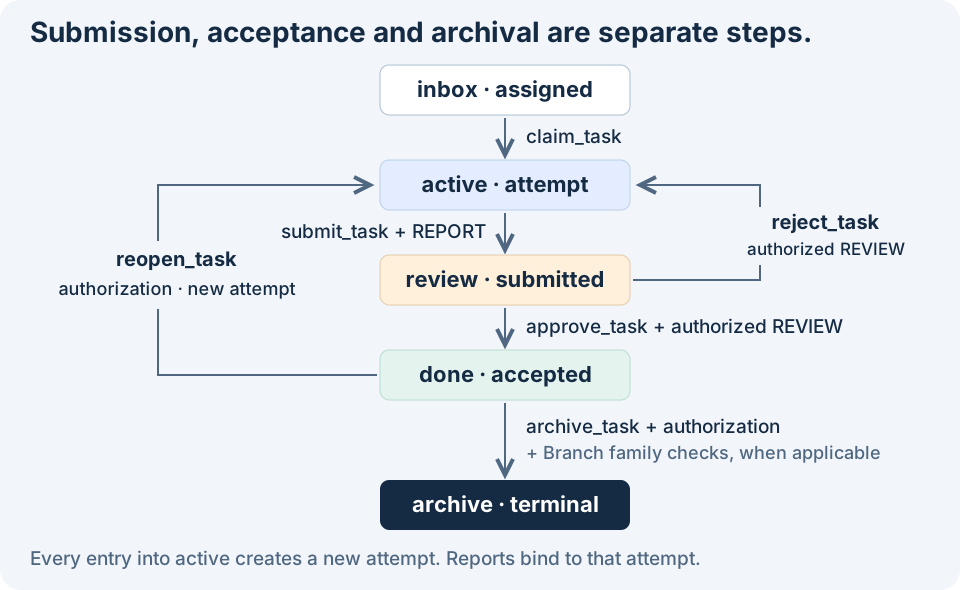
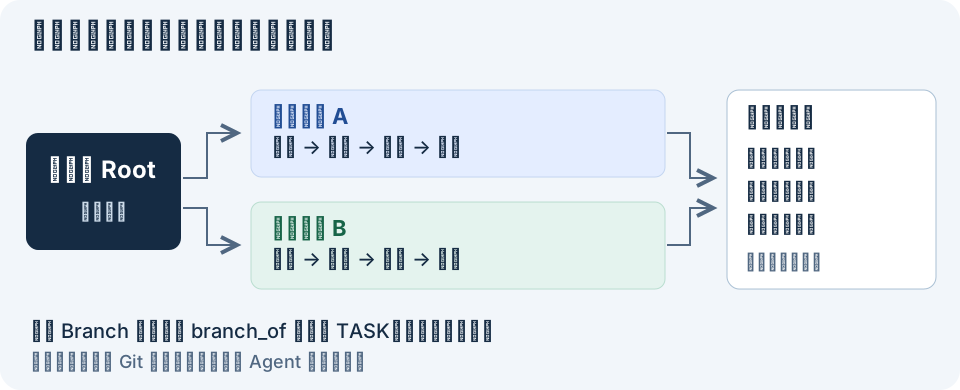
Sibling Branch tasks retain their own attempts and reports. Before Root archiving, the protocol checks current branch evidence, the family digest, convergence and separate archive authority.同级 Branch 各自保留尝试与报告。Root 归档前,要核对当前分支证据、任务族摘要、汇合记录和独立归档授权。
Read the parallel work model (中文) →阅读并行工作模型 →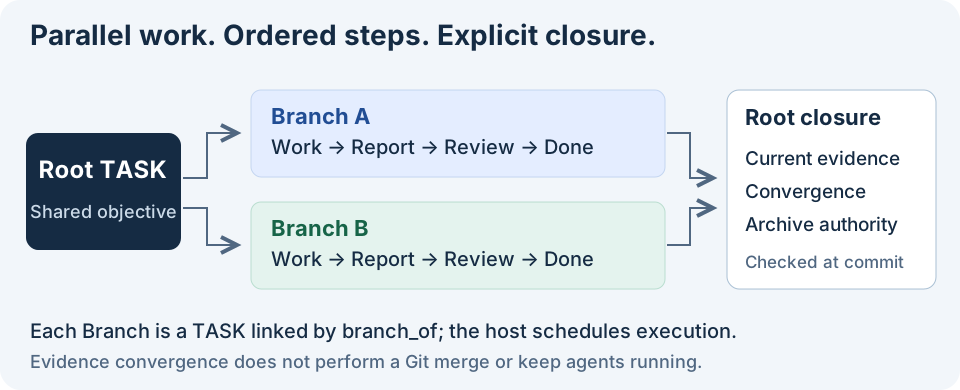
04 / ARCHITECTURE SERIES
Full Chinese essays, revised against 4.0. Read them here or use the English overview ↗.五篇完整正文,已按 4.0 修订。直接在站内阅读,从你关心的问题开始。
Persist tasks, deliveries and decisions outside the model.Agent 能推理、调用工具和生成结果,却不拥有自己的操作系统,也没有天然持久的工作事实。FCoP 的核心选择不是再造一个 Agent OS,而是借用单机操作系统最成熟的持久化界面——文件系统——把任务、交付、问题和审查从模型上下文中外化出来。
Eight contracts that independent implementations must preserve.FCoP 已经拥有 Library、MCP、生命周期、审查、恢复和大量工具,但这些都不等于 FCoP Core。真正的 Core 必须回答一个更严格的问题:如果第三方完全不用官方 Python、MCP 和 CodeFlowMu,只根据规范自行实现,哪些语义仍然必须一致?
Keep semantics, implementation and execution responsibilities clear.FCoP 4.0 如何区分 Core、规范、符合性验证、工具、组织策略与 Runtime,使功能增长保持清楚的边界。
Let independent work proceed; converge on current evidence.单机多 Agent 并不意味着只能串行,也不意味着应该把文件系统改造成高并发数据库。更适合 FCoP 的并行模型,是多个独立、可归属的串行工作流同时推进,并在需要时进行显式收敛。本文解释为什么共享可变状态是危险的,以及 Branch 如何成为行为外化层中的并行原语。
Connect tools and systems without confusing their responsibilities.讨论工具与上下文访问、工作事实、运行时与跨 Agent 系统通信的组合,区分已交付能力与网络映射设想。
05 / SPECIFICATION & RESEARCH
Current contracts and historical research have distinct versions. Choose the source that matches the work you are studying.当前契约与历史研究各有版本。阅读和引用时,选择与你讨论的成果相符的来源。
Identity, envelopes, lifecycle, relations, evidence, authority, creation idempotency and atomic recovery.身份、信封、生命周期、关系、证据、授权、创建幂等与原子恢复。
The DOI archives below describe earlier research. They are not identifiers for the 4.0 release.下列 DOI 对应早期研究归档,不代表 4.0 发布版本。
Field reports, agent interviews and hands-on cases, with their original publication and evidence links.现场报告、Agent 访谈与动手案例,保留原始发布和证据链接,按各篇历史版本阅读。
Historical tutorials: hands-on examples and recorded runs ↗. Follow each tutorial's original version; use the 4.0 setup above for new workspaces.历史教程:动手示例与运行记录 ↗。按各篇原始版本阅读;新工作区请使用上方 4.0 接入方法。
THREE REPOSITORIES
Protocol, Python library and MCP adapter. Use, implement and contribute here.协议、Python 库与 MCP 适配器。从这里使用、实现和贡献协作层。
☆ Star FCoP RESEARCH & COMMUNICATION研究传播入口Research on AI agents, digital employees and engineering practice.AI Agent、数字员工与工程实践的持续研究。
PRODUCT EXPERIENCE产品体验入口Packaged applications and downloads. Check releases for supported versions and licensing.打包应用与客户端下载。兼容版本和许可,以产品发布说明为准。